Shopify Price Testing: Run an A/B Price Experiment Right

Shopify price testing means showing one price to half of your visitors and a test price to the other half, then keeping whichever earns more. Shopify does this itself in its Smart Pricing app, where A/B pricing experiments are in early access for US stores on the Grow plan or higher; other stores use a price-testing app from the App Store. Either way, design the test before you start: one change, enough sales, and no edits while it runs.
The Smart Pricing mechanics come from Shopify’s Help Center pages on Smart Pricing and creating a pricing experiment, read on October 23, 2026. App prices are from their App Store listings, read on October 31, 2026.
Shopify’s own price experiments
When an experiment starts, Shopify splits your online store catalog into two versions: a control with your current prices and an Experimental version with the test prices. Visitors are assigned at random, 50% to each. About four days after the start, the experiment page shows results, refreshed daily. There is no set end date; you stop the experiment when the results are clear, and Shopify notes that more products and a longer run give more accurate results.
To be eligible, a store needs all of the following, per Shopify’s requirements:
- The Grow plan or higher, with enough visitor sessions to be included in early access.
- A US store selling to US customers.
- The new Shopify Markets, with a single catalog for the United States, and the US as a top-level market.
- At least 10 products, each with more than 25 sales a month.
Stores in early access may get AI-generated price tips; without them, you can still set up a manual experiment by choosing products and test prices yourself. The steps for a manual test: go to Apps > Shopify Smart Pricing, click Setup manual experiment, click Add products, set a test price for each (or select several and apply a percentage or fixed change), add the Cost per unit where it’s missing, then Start experiment and confirm in Before you start: Read carefully.
The limits shape what you can learn:
| Limit | What it means for the test |
|---|---|
| 1 active experiment at a time | Test one question at a time, such as “can our bestsellers carry 10% more?” |
| Up to 250 products | Group products that share a price logic instead of testing the whole catalog |
| 2 prices per product | Original against one test price; a third price needs a second experiment |
| Online store only | Facebook, Instagram, Google & YouTube keep showing the original price |
| No automatic stop | If profit drops badly, you stop the test yourself |
| No price update afterward | Apply the winning prices yourself, from the CSV on the results page |
Nothing elsewhere in the admin shows that an experiment is running, so tell your staff not to edit those products; a price change during the test invalidates the results. And Shopify advises pausing ads that show the prices of tested products, so ad viewers don’t see a price the store then contradicts.
Price testing apps
If your store isn’t eligible, or you sell outside the US, an app does the split instead. Two listings that appeared in the search results for this topic, as they showed on October 31, 2026:
| App | Rating | Plans | Price grows with |
|---|---|---|---|
| Pricing A/B Testing by Pricing.AI | 5.0 (5 reviews) | Free: 1 experiment a month, 1 product, 15 days. Pro $19.99/month: unlimited experiments, products and duration, 7-day trial | Experiments and products tested |
| AbProfit | 5.0 (5 reviews) | Basic $29/month, Advanced $71/month, Plus $149/month, 7- to 10-day trials | Your Shopify plan and support level |
Both have very few reviews, so treat the ratings as a weak signal and run a small test first. Before installing any price-testing app, check in its documentation how it changes the price a shopper sees and what happens at checkout, and test it yourself: a price that differs between the product page and checkout is the failure to rule out first. For apps that change prices continuously rather than testing them, see Shopify dynamic pricing.
Design a fair test
Shopify’s general rule for A/B testing is to change a single element and keep everything else the same between the two versions. Our rules for a price test build on it:
- Write the question and the stopping rule first. For example: “Test +10% on the 30 products in the Accessories collection; stop after four weeks or 200 orders per version, whichever comes later; keep the higher price if gross profit per visitor rises.”
- Judge by profit per visitor. A higher price can convert worse; what matters is whether the extra margin outweighs the lost orders. Fill in Cost per unit so the results can show it.
- Avoid holiday weeks and sales. A discount campaign or a seasonal spike running during the test changes behavior in both versions in ways the test can’t separate.
- Leave the products alone. No price edits, no new photos, no description rewrites while the test runs.
- Check the EU rule if you sell there. Shopify’s guidance on the EU Price Indication Directive says it might not apply to price changes made without a promotional statement. The risk comes later: a lower test price charged in the 30 days before a sale can become the reference price you must show; see EU price reduction rules.
- Don’t stop in the first four days. Shopify says an experiment stopped before the 4-day mark produces no results and can’t be restarted, and final results take up to 2 days after it ends.
A worked example of the metric, with illustrative numbers: the control sells 200 units at $40 with a $16 cost, a gross profit of $4,800 from 10,000 visitors, or $0.48 per visitor. The test version at $44 sells 185 units from 10,000 visitors, $5,180 of gross profit, or about $0.52 per visitor. Conversion fell from 2.0% to 1.85% while profit per visitor rose by about 8%. That doesn’t make $44 the winner yet: the test version hasn’t reached the 200 orders the stopping rule asks for, and a difference of 15 orders at this volume can be chance. In Smart Pricing, wait for the Conclusive indicator, which Shopify shows when results reach statistical significance at 95% confidence.
After the test
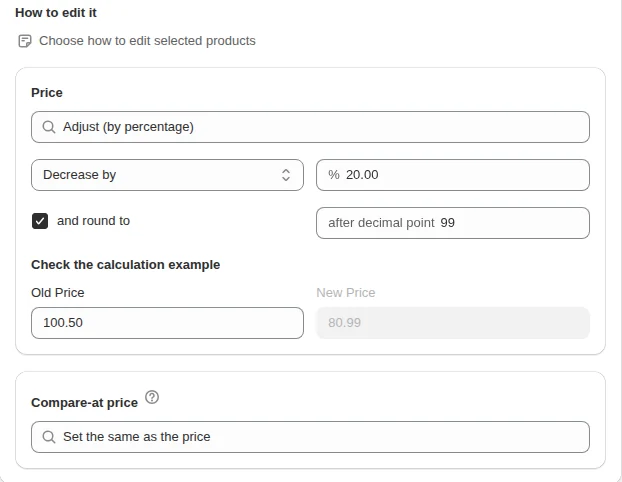
Smart Pricing doesn’t change your prices when an experiment ends. Download the CSV from the results page and apply the winning prices yourself, or follow Shopify’s page on updating prices from experiment results. If the winners are spread over many products with a rule you can describe (“+10% on the Accessories collection, rounded to .99”), our Bulk Product Edit applies a percentage change with rounding to a filtered set of products and shows a preview first. Smart Pricing’s other features, markdown and markup tips, are covered in Smart Pricing markdowns and markups, one of the guides in the pricing and sales hub.
FAQ
Can I A/B test prices on Shopify without an app? Shopify’s Smart Pricing app runs A/B pricing experiments for eligible stores: US stores on the Grow plan or higher, selling to US customers, with at least 10 products that each sell more than 25 times a month. The feature is in early access.
How long should a price test run? Shopify sets no fixed duration and shows the first results after about four days. We would decide the stopping rule before starting, such as a minimum number of orders per version, and not stop early on a good-looking day.
Does Shopify change my prices after the experiment? Smart Pricing doesn’t adjust prices after an experiment ends. You apply the results yourself, for example from the CSV on the results page.
Do test prices show on Google Shopping or Facebook? Smart Pricing tests prices only on your online store. Other sales channels, including Facebook and Instagram by Meta and Google & YouTube, keep the original price during the test.