Shopify Product Variants: Options, Limits and Setup

Shopify product variants are the versions of one product that a customer chooses between, such as a small blue T-shirt or a large green one. You create them by adding up to three options (size, color, material) with their values to a product, and each combination becomes a variant with its own price, stock, SKU and shipping weight. Since October 15, 2025, a product can have up to 2,048 variants, up from 100, but some themes and apps still stop at 100.
Limits and steps come from the Shopify Help Center pages on variants and adding variants (read October 23, 2026) and the Shopify Changelog post on the 2,048-variant limit (October 15, 2025).
Options, values and variants
The terms Shopify uses:
| Term | Meaning | T-shirt example |
|---|---|---|
| Option | A way the product varies, shown to customers as a selector | Size, Color |
| Option value | One choice within an option | Small, Medium, Large; Blue, Green |
| Variant | One combination of values, the thing a customer actually buys | Small / Blue |
Two options with three and two values give six variants. Add a third option with four values and you have 24. That multiplication is why variant counts climb fast, and why the limits below matter.
Once a product has variants, price, inventory and shipping are set on each variant, not on the product. Stock is tracked per variant, and you can manage it from the Inventory page.
Limits in 2026
- Up to 2,048 variants per product. Shopify raised the limit from 100 on October 15, 2025; the admin steps for setting up variants stayed the same.
- Up to three options per product. Each product can use different options: one can use size, color and style, another weight, finish and material.
- Up to 250 media items per product, and each variant can have one image from the product’s media list. A product with 300 color variants cannot give each its own photo.
- Daily upload limit for very large stores. A store with 500,000 or more variants can add up to 10,000 new variants a day through apps or CSV imports. This limit does not apply on Shopify Plus.
Above 100 variants per product, check your stack before you build:
- Some third-party themes do not support more than 100 variants and need an update.
- Some theme app extensions, public apps and sales channels may not support more than 100.
- Shopify’s Stocky app and the legacy Order Printer app do not support more than 100.
- Custom apps that use the REST Admin API must move to the GraphQL Admin API to handle more than 100.
Our advice: before you merge several products into one large product, open a test product with 150 variants and walk through your theme, your feeds and every app that touches products.
Add and edit variants
- Go to Products and open the product.
- In the Variants section, click + Add options like size or color.
- Enter the Option name (customers see it, so “Size”, not “sz”).
- Enter each value under Option values.
- For a second or third option, click + Add another option.
- Click Done, then Save, and add prices to the new variants.
Instead of typing values, you can connect an option to a category metafield, such as color for apparel. The values then come from shared entries you manage under Content > Metaobjects, so renaming “black” to “graphite” once updates every product that uses it, and color entries can show swatches on themes that support them.
For data that is not an option (a fabric code, a supplier reference), add variant metafields. Shopify’s pages are not fully consistent on whether customers can see them: one says variant metafields cannot be displayed to customers, another that compatible themes can reference them through the theme editor. Test in your own theme before you rely on it.
You can also choose which variants are published to which sales channels and catalogs, for example keeping a wholesale-only pack size out of your online store.
Each variant should get its own SKU and, if you scan stock, a barcode; our guide to Shopify SKU and barcode covers naming schemes.
One product or several?
Variants suit versions a customer compares on one page: sizes and colors of the same item. Separate products suit things a customer searches for separately, with different photos, descriptions or reviews.
A rule of thumb we use:
- Same item, different size or color: variants.
- Different design or model, even if the same price: separate products.
- More than three dimensions (size, color, length, fit): separate products for one dimension, or line item properties for custom requests.
If you need more than three options or 2,048 variants, Shopify points to three routes: a third-party app, theme code that collects line item properties from customers, or on Shopify Plus the Shopify Combined Listings app. A combined listing joins separate products into one listing with up to three extra options on top of each product’s own, and it can show specific variants in collection and search grids. How variant selectors look on the page is covered in Shopify product page.
Edit many variants at once
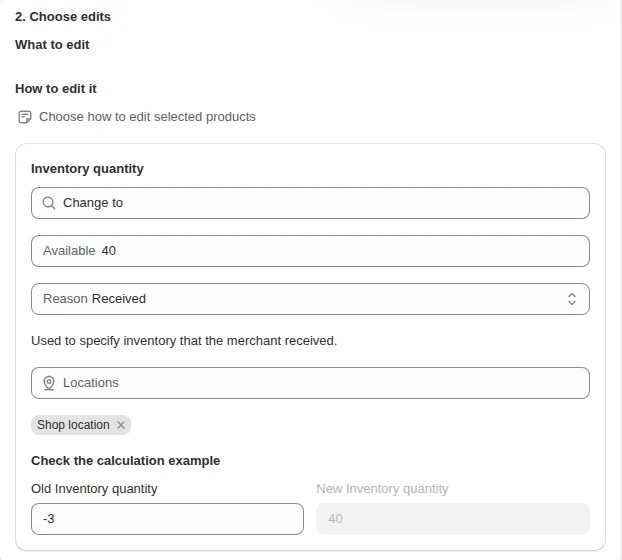
Changing prices, stock or SKUs across hundreds of variants one by one is slow. Shopify’s bulk editor handles up to 50 products at a time; for filtered changes across the catalog, our Bulk Product Edit edits prices, inventory, SKUs and other fields for variants picked by variant-level filters, with a preview before it writes, as shown in bulk edit products in Shopify. The inventory and catalog hub has the rest of the series.
FAQ
How many variants can a Shopify product have? A Shopify product can have up to 2,048 variants and up to three options. The limit was raised from 100 on October 15, 2025.
Why does my theme or app break above 100 variants? Some themes, apps and sales channels were built for the old limit of 100 variants. Shopify lists Stocky, the legacy Order Printer app and custom apps on the REST Admin API among those that do not support more.
Can I have more than three options on Shopify? A single product is limited to three options. For more, use a third-party app, line item properties in your theme, or on Shopify Plus the Combined Listings app.