Shopify Product Launch Checklist: Before, On, After Launch

A Shopify product launch checklist runs in three stages: two weeks before, when you build a waitlist and finish the product page as a draft; launch day, when you set the product to active, send the announcement and watch Live View; and the first 30 days, when you collect reviews and decide on a restock. The checklist below ties each step to the Shopify setting that does it. It assumes the store is already live; for opening a new store, use the store launch checklist instead.
Two weeks before
- Create the product as a draft. A product with Draft status is not visible to shoppers, so you can finish photos, variants, price, weight and inventory in peace. Check the URL handle now; changing it after launch breaks links you have already shared.
- Write the page for the first-time buyer: what it is, who it is for, what is in the box, size and materials, delivery time. Add the real photos and a short video.
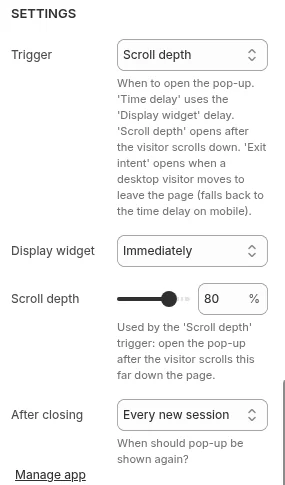
- Build the waitlist. A signup form for “tell me when it launches” can be a Shopify Forms form on a teaser page, or a popup on the pages where interested visitors land. Our Pop Up Discount app can show the offer on chosen page types, on a timer, at a scroll depth or on exit intent, and adds signups to your Shopify customers within your plan’s customer limit.
- Decide on pre-orders. If the stock arrives after launch day, a pre-order app can sell it now; Shopify’s pre-orders page says pre-orders work only for stores using Shopify Payments or PayPal Express, and can take full, partial or no payment at checkout. The setup is in pre-orders, and goal-based launches in crowdfunding.
- Prepare the launch discount, if any: one code, a real end date, limited to the waitlist segment so it does not leak.
- Write the emails: the launch announcement for the waitlist, a reminder for the last day of the offer, and a follow-up for buyers.
- Check stock at every location that fulfills online orders, and set what happens when it sells out: stop selling, or continue selling as a pre-order.
Launch day
- Set the product to Active and check it is published to the sales channels you want, including the online store and, if you use them, Shop and social channels.
- Place a test order with the launch code, on a phone, to the end of checkout, and refund it.
- Send the waitlist email first, an hour or two before the public announcement, so the people who asked get the first chance.
- Watch Live View. Shopify’s Live View page, read on October 23, 2026, describes it as a real-time view of activity on your store, with a map or globe and key metrics, under Analytics > Live View, shown in your store’s local time. Use it to spot a traffic spike with no orders, which can mean something on the page or in checkout is broken.
- Answer questions fast. Add the answers to launch-day chats and emails to the product page the same day, so the next visitor reads them before asking.
- Keep an eye on stock. If a variant sells out, decide whether to stop it or switch it to pre-order before the next email goes out.
First 30 days
- Ask for reviews after delivery. Shop asks buyers for a rating after an order is delivered, and a reviews app can send its own request, so the next visitor sees real ratings. Review tools are compared in product review apps.
- Read the numbers by day: sessions to the product page, add-to-cart rate and conversion from the Conversion rate breakdown report, and which emails and channels brought the buyers.
- Read the returns. Create returns with a reason, so the first week tells you whether a size, a color or the description misled people.
- Decide on the restock by day 21 at the latest, from the sell-through so far and your supplier’s lead time.
- End the launch offer on the date you announced. Extending it makes the end date you published untrue.
Other launch and operations guides are in the running a store hub.
Frequently asked questions
How do I build a waitlist on Shopify? Put a signup form on a teaser page with Shopify Forms, or show a popup on the pages interested visitors reach, and tag or segment the signups so the launch email goes only to them. Send the waitlist the news before the public announcement.
Can I schedule a product to go live? Keep the product as a draft until launch and set it to active on the day; Rollouts, which Shopify’s Fall ’26 Edition describes as scheduled launches and events that can combine theme, catalog and discount changes, can switch the rest of the launch on at a set date and time.
Should I take pre-orders? Take pre-orders when stock arrives after launch day and you can promise a delivery date. Shopify supports them through a pre-order app for stores using Shopify Payments or PayPal Express, with full, partial or no payment at checkout.