How to Scale a Shopify Store: Fix Bottlenecks First

To scale a Shopify store, fix the operations that break at twice your current order volume before you spend on traffic. Ask of each area (fulfillment, support, catalog, payments, team) whether it could take 2× the orders next month with the same people, and use Shopify’s own tools for the answers that are no. This is the operations side of growth; demand comes last.
The 2× test
| Area | Ask | How to measure it today | A “no” usually means | Shopify tool |
|---|---|---|---|---|
| Fulfillment | Can we pack and ship twice as many parcels a day? | Orders per day in Analytics > Reports, against the hours spent packing | A person is the bottleneck, or stock sits in one place | Locations and order routing; a fulfillment app or 3PL |
| Support | Can we answer twice the tickets in our target time? | Tickets per week and first-reply time in your inbox or helpdesk | The same questions are answered by hand | Inbox instant answers and the Inbox agent; a helpdesk |
| Catalog | Can we change prices, tags or stock for the whole range in an hour? | Time the last sale setup or supplier price update | Edits are made product by product | Bulk editor, CSV, an app |
| Payments | Are fees still sane at twice the volume? | Fees in the payments finance report, as a share of sales | Plan or payment fees are too high for your volume | Plan choice, Shopify Payments |
| Team | Can two more people work in the admin safely? | Staff accounts used against your plan’s limit | Staff limit reached, shared logins | Staff accounts and permissions |
A worked example: a store shipping 40 orders a day spends about four hours packing, with one person. At 80 orders that is eight hours, the whole working day, before returns or a late carrier pickup. Fulfillment fails the test, so the fix comes before any ad budget: a second packer, a packing station that cuts minutes per order, or a 3PL quote. Pick the one “no” that would hurt first and fix only that.
Shopify tools for each bottleneck
The facts below come from Shopify’s Help Center pages on choosing a plan, Shopify Flow and understanding order routing, read on October 23, 2026.
Plan. Higher plans lower credit card fees, so after sales are high enough the savings cover the higher monthly cost. Shopify’s estimated break-even points for Grow are $200,000 a year in the US, UK and Ireland with Shopify Payments and $60,000 without it; for Advanced they are $1,320,000 in the US and Australia with Shopify Payments, $880,000 in Canada, the UK and Ireland, and $528,000 without. Shopify says actual break-even varies. What each plan changes is described in Plus versus Basic.
Staff. According to Shopify’s new store checklist, the number of staff accounts depends on the plan: Basic allows none extra, Grow 5, Advanced 15 and Plus unlimited. Collaborator accounts and POS-only staff do not count toward these limits, so an agency or a freelancer with a Shopify Partner account does not use up a seat.
Automation. Shopify Flow is a free app on the Basic, Grow, Advanced and Plus plans. Workflows with triggers, conditions and actions can tag orders, alert you or send data to other apps. A first workflow for a growing store tags orders above a value for a manual check, or alerts you when a best seller drops below a stock level. Ideas are in Shopify Flow workflows.
Locations and routing. Order routing applies rules to each order and picks the locations that fulfill it. The default rules, in order, are to minimize split fulfillments, stay within the destination market and ship from the closest location. Add ranked locations if you want warehouses ahead of storefronts. You need nothing here until you have more than one stock location.
Markets. Selling to a second country is a scaling step with its own bottlenecks: currency, duties, delivery times and returns from abroad. Run the 2× test on the new market’s orders separately, because returns from abroad bring their own shipping costs and customs paperwork.
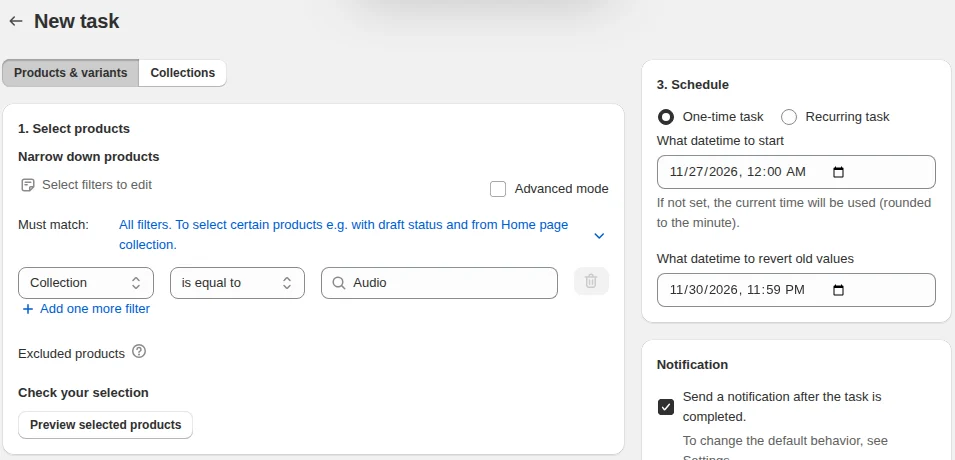
Bulk catalog work. A seasonal sale on 2,000 variants, a supplier price change or a tag clean-up is the kind of job that takes a day by hand. Shopify’s bulk editor and CSV import cover one-off edits. When the work repeats on a calendar, our Bulk Product Edit app runs price, inventory and tag changes for filtered products as a task with a preview; on its paid plans a task can be scheduled with an automatic revert time and undone from the task history.
Reports. Under Analytics > Reports, the Returning customers and Customer cohort analysis reports show whether the customers you already have come back. A store whose cohorts reorder can grow on email and retention before it pays for new traffic.
Then grow demand
When the 2× test passes, put money into acquisition, and check two numbers before you do. Ask Sidekick “Show my conversion rate by device type for the last 30 days”, and fix a weak mobile conversion rate before you pay for visits. Then read the Returning customers report: if few buyers order twice, fix the offer or the follow-up email before buying more first orders. Demand tactics are in growth hacks for new sellers and the Shopify marketing hub. The running a store hub has the other operations guides.
Frequently asked questions
When should I upgrade my Shopify plan? Upgrade when the savings on credit card fees at your sales volume cover the higher monthly price, or when you need what the plan adds, such as more staff accounts. Check Shopify’s break-even tables for your region.
Do I need a 3PL? A 3PL makes sense when packing and shipping take more time than you can add yourself and orders are predictable enough to hand over. Compare 3PLs on the fee per order and on how they connect to Shopify.
What should I automate first? Start with the task you repeat daily that has clear rules, such as tagging orders or alerting yourself to low stock. Build one Flow workflow, check it for a week, then add another.