Best Shopify SEO Apps in 2026: Native Features First

The best Shopify SEO apps in 2026 are the ones that do a job Shopify does not already do for you. Shopify generates your sitemap, canonical URLs, a default robots.txt, hreflang tags through Markets and image CDN optimization on every store; a good SEO app adds bulk editing of titles and alt text, structured data beyond your theme’s, broken-link and redirect management, or image compression. Start from the gap, pick one app for it, and remove apps you do not use, because every app’s code can slow your store.
What Shopify includes comes from its Help Center pages on sitemaps, robots.txt, Markets SEO, Grow SEO, optimizing for AI and web performance and URL redirects (read October 23, 2026). App prices, limits and ratings are as their Shopify App Store listings showed them on October 23, 2026. The apps in the table are not ours, and there are no affiliate links.
What Shopify does for SEO without an app
Before you install anything, know what is already handled:
- Sitemap. Every store generates
sitemap.xmlat the root of its domain, linking separate sitemaps for products (with the primary image), collections, pages and blog posts. It updates itself when you add content. With international domains, each domain gets its own sitemap. - robots.txt. A default file that Shopify says works for most stores. You can customize it by adding a
robots.txt.liquidtemplate, but Shopify Support does not help with that edit and warns that mistakes can cost all your traffic. - International SEO. Markets adds hreflang tags automatically when you set up domains, subfolders or subdomains and languages for each market. Subfolders (
yourstore.com/fr/) share your main domain’s authority and are what Shopify recommends for most stores. - Speed basics. Hosting on global servers, a Cloudflare CDN, and an image CDN that serves resized, compressed images in a suitable format. Shopify’s Web Performance reports show Core Web Vitals (LCP, CLS, INP) from real visitors.
- Editable SEO fields. Page title, meta description and URL handle on every product, collection, page and post, alt text on images, and URL redirects (up to 100,000, or 20 million on Plus).
- Grow SEO (early access). Shopify’s own app suggests longer page titles and product or collection descriptions with AI, up to 100 suggestions, English only, product and collection pages only; you deploy or dismiss suggestions one by one or all at once.
- Knowledge Base app. Free on all plans; it shows the FAQs AI shopping agents use about your store and lets you add your own.
When you read an app listing, check it against this list, so you do not pay for something Shopify already does.
SEO apps by job
Each row lists what the app’s listing says it does, read on November 1, 2026.
| Job | App | Free plan | Paid plans | Price grows with | Rating |
|---|---|---|---|---|---|
| All-round with AI writing and schema | StoreSEO AI SEO & Image Tools | Yes (25 products, 25 images, 200 AI credits) | $14.99, $39.99, $249.99 a month | Products (100, 250, 10,000), images and AI credits | 5.0 (772) |
| Audit, broken links, JSON-LD, IndexNow | Smart SEO AI & Image Optimizer | Yes (50 images, 20 AI generations, audit of 20 pages) | $14.99, $24.99, $49.99 a month | Feature tier and audit size | 5.0 (961) |
Both write alt text and meta tags and optimize images, so choose by the pricing unit. StoreSEO’s free and lower plans cap the number of products, so a large catalog lands on the $249.99 tier; Smart SEO charges by feature tier and shows its paid-plan quotas only for the trial period, so ask the developer for the monthly limits before you pay.
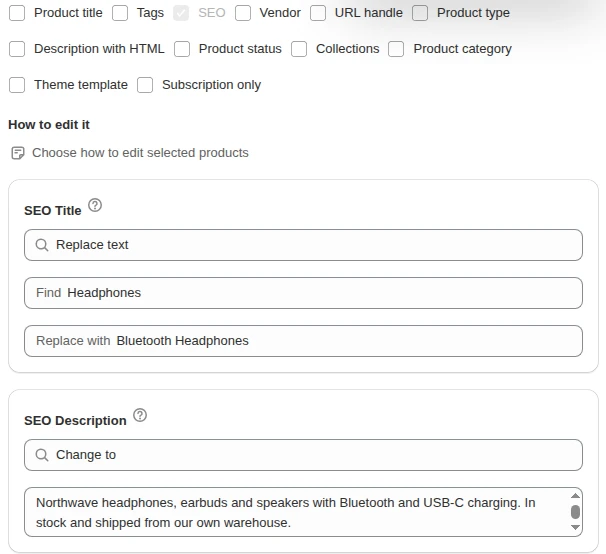
A different job is fixing hundreds of products with empty or duplicated SEO titles at once: our Bulk Product Edit app edits SEO titles and descriptions for products picked by filters on product and variant fields and shows a preview before it writes, as described in bulk edit SEO titles.
A few jobs are better done without a paid app at all. Google Search Console is free and shows which queries and pages matter; our list of free SEO tools for Shopify covers it and others.
Apps that can hurt
Shopify names three things as the biggest factors in a store’s speed: the theme, the apps installed, and third-party code added by hand, including tag managers. SEO apps fall into the second group, and Shopify advises checking that every installed app creates enough value to offset any performance loss.
Three checks keep an SEO app honest:
- Measure before and after. Note your Web Performance report and a PageSpeed Insights run before installing, and compare two weeks later.
- Watch for duplicate structured data. If your theme already outputs product JSON-LD, an app adding a second block can produce conflicting data; test a product page in Google’s Rich Results Test.
- Check what uninstalling leaves behind. Some apps edit theme code. Before removing an app, ask the developer what it changed, or duplicate your theme before installing.
Shopify also notes that many speed recommendations from third-party scanners are already handled by Shopify or do not apply to Shopify stores, so an app promising to fix them may be selling a fix you already have.
Pick by store size
- New store, under 50 products. No paid SEO app. Write titles and descriptions yourself, add alt text, submit the sitemap to Search Console, and use a free plan only if you want a checklist.
- Growing store, a few hundred products. One all-round app on a lower tier, or an image optimizer if your pages are image-heavy. Run a full Shopify SEO audit first so you know which job you are paying for.
- Large catalog, thousands of variants. Price by unit: product-capped plans get expensive, and bulk editing by filter keeps SEO fields consistent. For crawl and duplicate-URL questions, see Shopify technical SEO.
The full checklist for Shopify SEO, apps or not, is in the Shopify SEO hub.
FAQ
Do I need an SEO app on Shopify? Shopify already generates your sitemap, robots.txt and canonical URLs, adds hreflang tags when you set up Markets with their own URLs, and gives every page editable SEO fields. An app helps when you need to edit many products at once, add structured data your theme lacks, or compress many images.
What is the best free SEO app for Shopify? StoreSEO and Smart SEO both list free plans with limits, such as 25 products or 50 images. Pick the one whose free limit fits your catalog, and remember Shopify’s Knowledge Base app is free on all plans, while Grow SEO is in early access for some merchants.
Can SEO apps slow down my Shopify store? Shopify lists installed apps among the biggest factors in store speed. Compare your Web Performance report before and after installing, and remove apps you no longer use.
What does Grow SEO do? Grow SEO is Shopify’s own app, in early access, that suggests more detailed page titles and product or collection descriptions with AI. It works in English only and shows up to 100 suggestions.