Shopify Product Listing Optimization: A Checklist That Sells

Shopify product listing optimization means getting each field of the product right, because each field feeds something: the title and description sell to the shopper, the product category and metafields feed your filters and Google, the SEO fields write your search result, and status and sales channels decide where the product appears at all. Go through the fields in the order below, product by product for your best sellers, and in bulk for the rest of the catalog.
Shopify facts come from the Help Center pages on writing product descriptions, generating them, product media, product categories and variants, read on October 23, 2026.
The checklist
| Field | What good looks like | What it feeds |
|---|---|---|
| Title | What the product is, in the words shoppers search for, plus the key attribute (“Linen duvet cover, king”) | Store search, Google, AI assistants, collection pages |
| Description | Benefits, then specifics: dimensions, materials, care, fit. No vague praise | The shopper’s decision, Shopify Inbox’s AI answers, AI channels |
| Media | Several photos, consistent aspect ratio, the first one clear on a white or plain background; video if it shows use | Collection grid, cart, checkout, Google Shopping |
| Alt text | A short description of each image | Accessibility, image search |
| Variants | Options named the same way across products (“Navy”, not “navy blue” on one and “dark blue” on another) | Filters, swatches |
| Product category | The most specific category in Shopify’s taxonomy | Tax rates with Shopify Tax, category metafields, marketplaces, Google and Facebook |
| Category metafields | Filled in: size, color, material and the other attributes the category offers | Filters, product data for channels |
| Product type, vendor, tags | Consistent values | Collections, standard filters, internal organization |
| SEO title and description | A search-result title and summary written for the click | Google’s result |
| Status and channels | Active, published to the channels you sell on | Whether the product shows anywhere |
Score each best seller against the table: one point per field done well. Fix the lowest-scoring best sellers first, because those pages already have traffic.
Titles and descriptions
Shopify’s Help Center gives practical rules for descriptions:
- Write for your ideal customer, in the words they use, and answer the questions they ask.
- Lead with benefits, then list the features: dimensions, materials, functions, care instructions, and fit for clothing.
- Avoid generic statements such as “excellent product quality”; they tell the shopper nothing and can make them skeptical.
- Back every claim. If you say the product is the best in its category, give the proof, or tone it down.
You can ask Sidekick to draft a description from the title and a few keywords, in any language Shopify supports, from the admin on a desktop computer. Shopify’s warning matters: you are responsible for the accuracy of everything you publish, and generated text can include benefits you never listed. Read every generated description against the real product before saving.
For titles, put the product noun first and the distinguishing attribute next. Product titles also feed AI shopping assistants: Shopify’s agentic storefronts for ChatGPT, Gemini and Copilot are active by default for eligible stores and read the same product data.
Category, metafields and variants
Every product should have a category from Shopify’s Standard Product Taxonomy; without one it is saved as uncategorized, which also happens to products created by CSV or apps. When you pick a category, Shopify offers category metafields for it (for a shirt: size, neckline, sleeve length, fabric and more). Fill them in; they become filters and structured data for every channel.
Variants allow up to three options per product. Connect variant options such as color to the category metafield instead of typing free text, and the values stay consistent across the catalog; renaming a color then happens once. How specs stored this way turn into filters and spec tables is shown in our guide to specs as category metafields.
Media
Shopify accepts product images up to 5,000 × 5,000 px (25 megapixels) and under 20 MB; for square images 2,048 × 2,048 px usually displays best. Use the same aspect ratio for every main image so the collection grid lines up. Videos can be up to 10 minutes and 1 GB, and 3D models up to 500 MB. The first media item is the main one shown on collection pages, the cart and checkout. Catalog topics like this one are collected in the running a store hub, and a shot list for product photos is in our product photography guide.
Search engine listing fields
Each product has a search engine listing section with a page title, a meta description and the URL handle. Write them for the search result, not as a copy of the product title. Product SEO in depth, including structured data and apps, is in the Shopify SEO hub.
Fix listings in bulk
Most catalogs need the same fix on hundreds of products: a tag added, a vendor renamed, SEO titles rewritten to one pattern.
- Shopify’s bulk editor (select products, Bulk edit, add Columns) is quick for a few dozen products and a few fields.
- CSV export and import suits a full catalog rewrite you prepare in a spreadsheet.
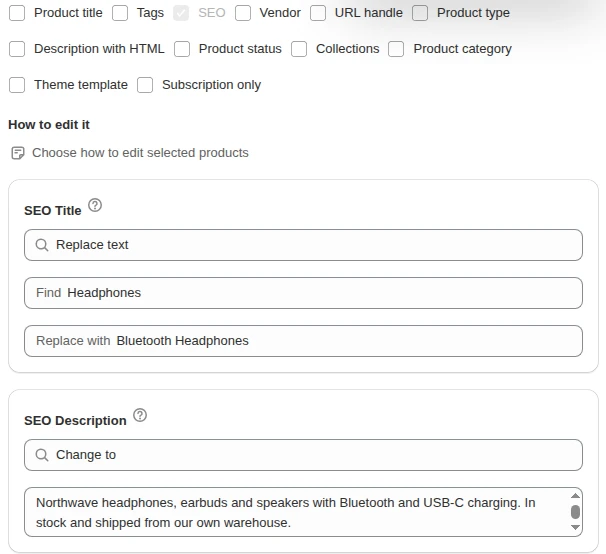
- A bulk edit app suits rule-based changes. Our app Bulk Product Edit finds and replaces text in titles and descriptions, adds or removes tags and sets vendor, type and SEO title and description across filtered products, with a preview before anything changes.
For category metafields, use Shopify’s product editor or a CSV import.
Frequently asked questions
How long should a Shopify product title be? Long enough to say what the product is and its key attribute, short enough to read in a collection grid. Lead with the product noun (“Linen duvet cover, king size”) and keep extra marketing words for the description.
Should I use AI to write Shopify product descriptions? Sidekick can draft descriptions from a title and keywords, which saves time on large catalogs. Shopify says you remain responsible for the accuracy of everything you publish and that generated text can add benefits you did not list, so check each one against the product.
What is a product category in Shopify? It is a category from Shopify’s Standard Product Taxonomy, such as Apparel & Accessories > Clothing > Clothing Tops > Shirts. It brings category metafields with it, helps Shopify Tax apply the right rate, and gives marketplaces and Google a standard product type.