Shopify Product Page SEO: Every Field and What to Write

Shopify product page SEO comes down to six fields on each product, plus its status: the product title (which becomes the page’s H1), the Search engine listing page title and meta description, the URL handle, the description, and the alt text on each image. Fill them so each product targets its own specific search phrase, write the description with the details a buyer or an AI assistant needs, and keep products you do not want found unlisted instead of deleting them.
Field names and limits come from Shopify’s Help Center pages on adding and updating products, keywords, alt text, optimizing for AI and hiding pages (read October 23, 2026).
The fields that matter
| Field | Where it is | What to write |
|---|---|---|
| Title | Top of the product page in the admin | The product’s name with its main keyword; Shopify uses it as the page’s H1 |
| Page title | Search engine listing section (pencil icon) | The clickable line in Google: main keyword first, a distinguishing detail, brand at the end. Keep to about 60 characters; Shopify warns text over 70 may be cut |
| Meta description | Same section | What the buyer gets and one reason to click, with the keyword; Shopify suggests including your store’s name. Text over 320 characters may be cut, and its general SEO page suggests about 160 |
| URL handle | Same section | Generated from the title when you create the product; edit it once to a short, readable form, then leave it |
| Description | Description editor | Details people and AI systems need: materials, sizes, use, care, comparisons |
| Alt text | Click an image, then Add alt text | What the image shows, using the page’s keywords naturally; 125 characters or fewer recommended, 512 maximum |
| Status | Status section | Active to sell; Unlisted to keep a product reachable by direct link but out of search, the sitemap and collections |
Page title vs product title. They do different jobs. The product title is what shoppers read on the page and in collections, so keep it clean (“Merino Hiking Socks”). The page title is what searchers read in Google, so it can carry more (“Merino Hiking Socks, Cushioned, 3 Pairs | Brand”). Sidekick can draft both from a prompt such as Shopify’s example, “Write a page title and meta description for my Wool Hiking Socks, and include the keyword merino socks”, and you review the text before saving.
The handle. Shopify warns against editing the handle often, because the product might stop showing in search results. If you must change it after a product has traffic, create a URL redirect from the old address.
Status instead of deletion. Deleting a product that has search traffic loses the page. Setting it to Unlisted hides it from search engines, the sitemap, Shopify Catalog, collections, store search and recommendations, while the direct link keeps working. If a product is gone for good, redirect its URL to the closest product or collection.
For meta titles and descriptions across your whole store, see Shopify meta tags; for choosing which phrase each product targets, keywords on Shopify pages.
Write the description for people and AI
Shopify’s AI guidance asks for two layers on a product page. For shoppers, keep the essentials visible: a clear title, a short summary of benefits, price, availability and key features, and good images. For AI systems that read the page, add the full detail: specifications, comparisons with similar products, sizing guides, materials and care. Detail that matters to AI but clutters the page can sit lower down.
In practice, write the first two sentences for the buyer deciding now, then a spec list, then a section answering the questions customers email you. Avoid copying the manufacturer’s description; Shopify’s keyword guidance warns against it, and other stores selling the same item will have the same text. More on AI assistants in optimize for AI search.
If Shopify’s Grow SEO app is available to you (early access, English only), it suggests longer page titles and product descriptions that you deploy or dismiss.
Images and alt text
Alt text is shown if an image fails to load, read aloud by screen readers, and used by search engines to understand the image. Describe what is in the picture (“navy merino hiking sock, cushioned sole, side view”), as Shopify advises. Alt text can be added one image at a time, uploaded in a CSV, or accepted from the media editor’s suggestions for images that have none; check suggestions before accepting.
Use image file names that describe the product before you upload them: Shopify cannot rename files after upload, so fixing a name means replacing the image.
Variants and duplicate pages
Sizes and colors belong as variants of one product with one URL. Separate products for each color with near-identical descriptions end up targeting the same search phrase. Shopify adds canonical tags automatically; your part is not creating duplicate products by hand.
Many products at once
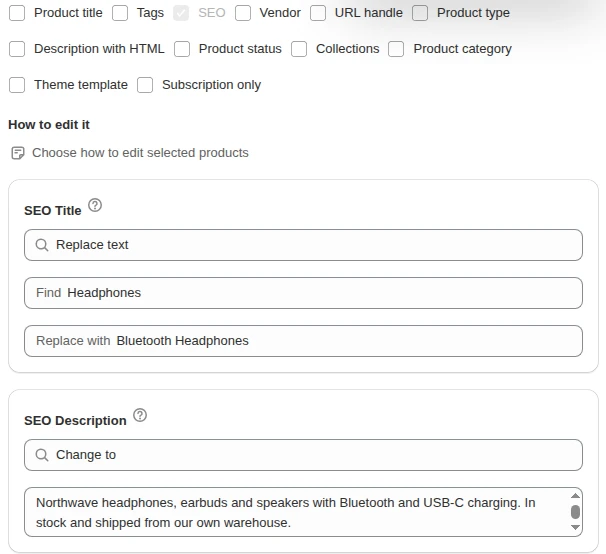
Each product’s main phrase is yours to write, but shared parts can change in bulk: our Bulk Product Edit app can append your brand to SEO titles or find and replace a word across them for products picked by filters, with a preview before it writes, as shown in the guide to bulk edit SEO titles. The Shopify SEO hub has the rest of the checklist.
FAQ
How long should a Shopify product SEO title be? Keep it to about 60 characters. Shopify’s product page warns that titles over 70 characters may be cut off in search results.
What is the difference between the product title and the SEO title? The product title appears on the page as the H1 and in your store. The SEO page title, set in the Search engine listing section, is the clickable line in search results and can include extra keywords.
Should I change product URL handles for SEO? Edit a handle once when you create the product, if the generated one is messy. Shopify warns that changing it often can stop the product showing in search results.
How do I hide a product from Google but keep selling it by link? Set the product status to Unlisted. It is then hidden from search engines, the sitemap and your store’s collections and search, but the direct link still works.