How to Add Keywords to Shopify: Which Keyword, Which Page

To add keywords to Shopify, put them in five places on each page: the page title (the SEO title shown in search results), the meta description, the H1 (which Shopify takes from the product, collection, page or post title), image alt text and the body text. The bigger decision is which keyword goes on which page: specific long-tail phrases on product pages, broader category terms on collection pages, and questions in blog posts, so each search has one page of yours that answers it.
Shopify’s guidance on keyword placement and alt text comes from its Help Center pages on adding keywords and alt text (read October 23, 2026). The page-type map and the worked example are ours.
The places Shopify reads
| Place | Where to edit it | Shopify’s guidance |
|---|---|---|
| Page title (SEO title) | Search engine listing section of a product, collection or post; Online Store > Pages > Edit website SEO for pages; Online Store > Preferences for the homepage | Unique and descriptive, main keyword near the start, 60 characters or fewer (the field takes 70) |
| Meta description | Same section, Description field | Unique per page, plain language, around 160 characters |
| H1 | The product, collection, page or post Title field | Shopify generates the H1 from the title |
| Image alt text | Click the image, then Add alt text (products) or Edit image (collection and post images) | Describe what the image shows, using the page’s keywords in readable phrases; up to 512 characters, 125 or fewer recommended |
| Body text | Product or collection description, page or post content | Readable, unique phrases; do not copy manufacturer descriptions |
Shopify’s title tips are worth copying because they are concrete: target the main keyword (“Star Wars Button Down Shirts” rather than “Star Wars”), add a secondary keyword (“Modular Sectional Sofas & Couches”), name a distinguishing feature (“Body Butter - Natural & Cruelty Free”), and mention a real benefit with its limits (“Free Shipping on US Orders $60USD+”).
Alt text can also come in by CSV, and the media editor may suggest alt text for images that have none; accepting a suggestion saves it.
Long-tail on products, broad on collections
A map we use:
| Page type | Keyword type | Example (a candle store) |
|---|---|---|
| Product | Long-tail, specific: material, scent, size, use | “soy candle lavender 8 oz”, “wooden wick candle cedar” |
| Collection | Broader category terms | “soy candles”, “wooden wick candles” |
| Homepage | Brand and the store’s main category | “[brand] handmade candles” |
| Blog post | Questions and how-tos | “how long should a candle burn the first time” |
Worked example for one product family, the lavender soy candle:
- Product page. SEO title “Lavender Soy Candle, 8 oz, Cotton Wick | [Brand]”. H1 “Lavender Soy Candle 8 oz”. Description mentions burn time, wax, wick and scent notes in sentences. Main image alt text “lavender soy candle in amber glass jar with cotton wick”.
- Collection page “Soy Candles”. SEO title “Soy Candles: Hand-Poured, 6 Scents | [Brand]”. A short paragraph at the top uses “soy candles” and names the scents, linking to each product.
- Blog post. “How long to burn a soy candle the first time” answers the question and links to the collection.
Each page targets a different search, and they link to each other in the direction a buyer moves: question, category, product. If two of your pages chase the same phrase, merge them or give one a different target. How to find the phrases in the first place is covered in Shopify keyword research.
Questions belong in blog posts
Product pages answer “which one do I buy”. Questions such as “how”, “why” and “what size” are better answered in a post, where you have room for steps and images, and the post can link to the product. Shopify’s keyword guidance applies the same way: use the question in the post title and H1, and use related terms in readable sentences in the body.
Do not stuff
Shopify’s Help Center warns that customers do not click links that use keywords randomly, and search engines might ignore sites without readable phrases. One main keyword per page, a related phrase or two, and normal sentences are enough. If a title reads like a list of keywords, rewrite it for a person. For the title and description fields in detail, see Shopify meta title and description; for everything else on a product page, Shopify product page SEO.
Updating many pages
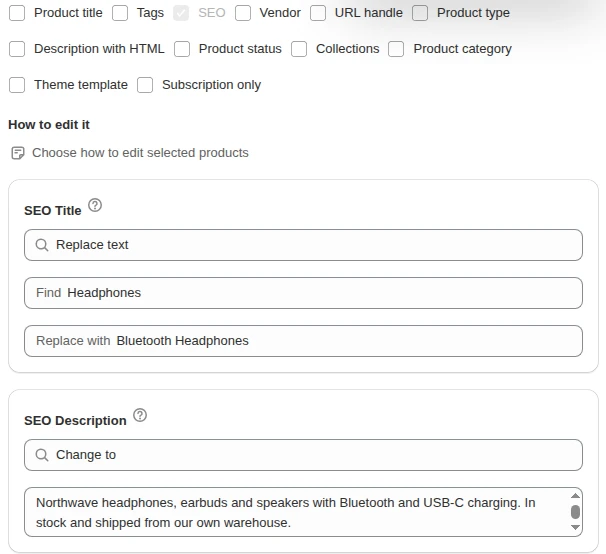
Write each product’s main phrase yourself, then handle the shared parts in bulk: our Bulk Product Edit app can add text such as “| [Brand]” to the end of SEO titles, or find and replace a word, for filtered products in one task with a preview, as described in bulk edit SEO titles. The Shopify SEO hub collects the rest of the series.
FAQ
Where do I add SEO keywords in Shopify? Add them to the SEO title and meta description in each page’s Search engine listing section, the product or page title (which becomes the H1), image alt text and the body text.
How long should a Shopify SEO title be? Shopify recommends 60 characters or fewer so search engines do not shorten it, although the field accepts 70.
Should I use the same keyword on several products? Give each product its own specific phrase, and use the shared category term on the collection page that lists them.
Does Shopify have a keywords field? Shopify’s keyword guidance names page titles, meta descriptions, alt text and page content (plus the title that becomes the H1), and no separate keywords field. Put keywords there in readable sentences.