Best Shopify Apps in 2026: Free Shopify Apps First

The best Shopify apps to start with are the free ones Shopify builds itself: Shopify Flow for automation, Shopify Messaging for email, Shopify Forms for signups, Shopify Inbox for chat and Translate & Adapt for languages. On top of those, add one paid app per job you actually have, such as product reviews or catalog edits, and skip the rest until a real problem asks for it.
Prices, ratings and review counts below are as the Shopify App Store listings showed them on October 23, 2026. Rules for checking an app come from the Shopify Help Center pages on finding and choosing apps and installing them, read the same day. We build two of the apps mentioned here, Pop Up Discount and Bulk Product Edit; both are marked “our app”.
Free apps made by Shopify
| App | Job | Price | Rating |
|---|---|---|---|
| Shopify Flow | Automations: tag orders and customers, alerts, hand data to other apps | Free | 4.7 (14,998 reviews) |
| Shopify Messaging | Email campaigns and automations | First 10,000 emails a month free, then from $1 per 1,000 emails | 4.8 (4,717) |
| Shopify Inbox | Chat on your store, with an optional AI agent | Free | 4.6 (5,805) |
| Shopify Forms | Signup and popup forms that add customers to your list | Free | 4.5 (756) |
| Translate & Adapt | Store translations; automatic translation for two languages free | Free | 4.4 (1,398) |
| Search & Discovery | Search filters, synonyms, product boosts, recommendations | Free | 2.6 (510) |
Search & Discovery’s low rating does not change its role: it is Shopify’s free way to set up storefront filters, synonym groups and recommendations. Read the recent reviews and decide whether its limits matter for your catalog. Translate & Adapt reviewers also point out that the two-language limit on automatic translation is easy to miss until you reach it.
Best Shopify apps by job
Once the free layer is in place, these are the jobs where a paid app usually earns its fee, if you have the job at all. One pick per job, with the pricing unit, because that decides your bill as you grow.
| Job | Free option | Paid pick | First paid plan | Price grows with | Rating |
|---|---|---|---|---|---|
| Product reviews | Shop product reviews (in the Shop app) | Judge.me | Free plan; Awesome $15/month | Flat | 5.0 (48,952) |
| Email and SMS beyond Messaging | Shopify Messaging | Klaviyo | Free up to 250 active profiles and 500 emails; Email $20/month for 251–500 contacts | Contacts (active profiles) | 4.7 (3,404) |
| Discount popup | Shopify Forms | Pop Up Discount (our app) | Free plan up to 250 customers; paid from $3.99/month | Your Shopify plan (Basic, or Shopify and higher) | our app, see listing |
| Search and filters | Search & Discovery | Searchanise | Free under 25 products; Basic $19/month up to 1,500 products | Products in catalog | 4.7 (1,261) |
| Support helpdesk | Shopify Inbox | Gorgias | Starter $10/month, 50 tickets, 3 agents | Tickets | 4.3 (705) |
| Bulk catalog edits | Shopify’s bulk editor and CSV | Bulk Product Edit (our app), or Matrixify for full import/export | BPE: free plan, paid from $9.99/month. Matrixify: Basic $20/month, 5,000 products per file | BPE: items per task and tasks per month. Matrixify: items per file | Matrixify 4.9 (1,813) |
| Loyalty | Store credit + customer segments | Smile | Free up to 200 orders/month; Essential $15/month | Orders per month | 4.9 (4,649) |
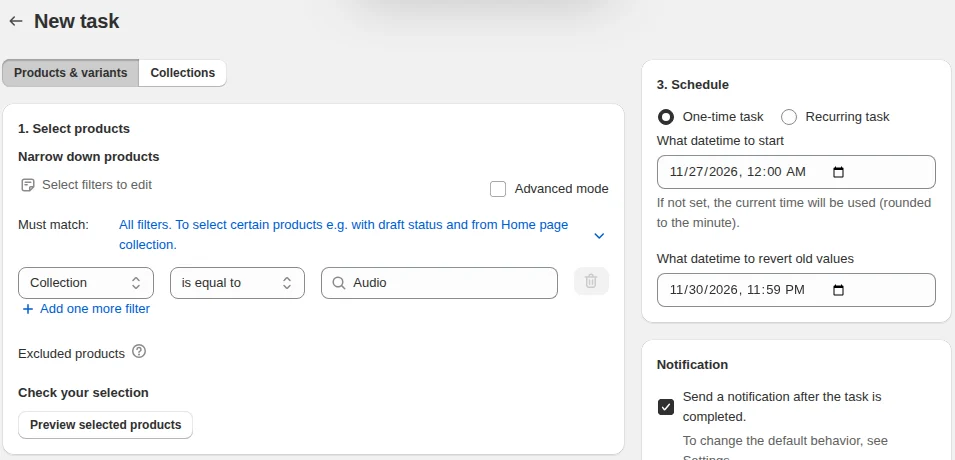
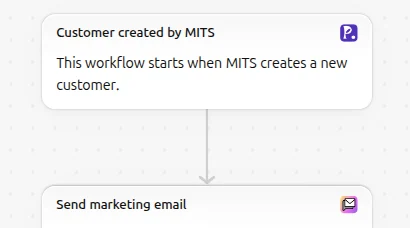
Pop Up Discount shows a popup that trades a discount code for an email, creates the visitor as a Shopify customer and sends the code through Shopify Flow; it has no spin-to-win wheel. Bulk Product Edit changes prices, inventory, tags, text, SEO fields and metafields across filtered products with a preview, imports CSV and Excel files, and schedules sales that revert by themselves on paid plans.
Privy, which older popup roundups list, showed “This app is not currently available on the Shopify App Store” on its listing on October 23, 2026.
For a deeper comparison in one job, see our guides to Shopify customer service apps and Shopify loyalty apps.
How to check an app before you install it
We publish apps on the App Store, so we go through Shopify’s review from the developer side. Run these checks before you install:
- Look for the Built for Shopify badge, or use the Built for Shopify filter in search. Shopify certifies these apps on performance, design and integration. One of the rules is that the app cannot lower your storefront’s speed score by more than 10 performance points. Shopify reviews certifications every year, and an app that stops meeting the rules loses the badge.
- Notice the “Ad” label. Developers can pay to show their app on the App Store’s home, category and search result pages, and those placements are labeled Ad. Recommendations such as Popular with stores like yours are not ads.
- Read the Install app screen. Before installing, Shopify shows what the app can access, in two groups: View personal data and View and edit store data. A reviews app that wants to edit your orders deserves a question to its developer. The same screen links to the developer’s privacy policy.
- Read recent 2- and 3-star reviews. Shopify’s overall rating weights recent reviews more, but the middle reviews tell you what breaks. Check whether the developer replies.
- Check the pricing unit against your busiest month: per order, per contact, per ticket, per product.
After installing, the app’s about page shows its activity and permissions at any time. Our Shopify App Store guide walks through finding, comparing and removing apps.
A starter stack by store stage
Install an app for a job you have today, and add the next one when that job appears. The running a store hub has a guide for each of these jobs.
- Before your first 10 orders: Shopify Inbox, Shopify Forms, Shopify Messaging for a welcome email, and Flow for an order alert. All free.
- Steady sales, a few hundred orders a month: add a reviews app and, if email has become your main channel, Klaviyo or a paid Messaging allowance. Add a discount popup if you want a bigger email list.
- A large catalog or frequent sales: search and filters (Search & Discovery first, a paid search app if shoppers cannot find products), and a bulk editor for price changes and sales.
Signs your app stack needs a clean-up
- Two apps for the same job, such as two popup apps or two chat widgets, both loading on every page.
- Uninstalling an app and leaving its code behind. Shopify’s Help Center on uninstalling apps warns that some apps add code to your theme that is not removed automatically, so check your theme after removing one.
- Paying for an AI writing app for product descriptions before trying Shopify’s own: Sidekick and the built-in product description generator are part of the admin.
- Keeping apps installed after you stop using them. Paid ones keep billing, and storefront ones keep loading.
Frequently asked questions
What are the most popular Shopify apps? The App Store does not publish install counts, so review counts are the closest public signal. On October 23, 2026, Judge.me had 48,952 reviews, Shopify Flow 14,998, Shopify Inbox 5,805 and Smile 4,649.
Are Shopify apps free? Many are. Apps made by Shopify, such as Flow, Inbox, Forms and Translate & Adapt, are free, and Shopify Messaging is free up to 10,000 emails a month. Shopify’s Help Center says most paid apps offer a free basic plan or a free trial period.
How many apps should a Shopify store have? A store needs one app for each job it actually has, and no more. Each storefront app adds code to your pages, so remove apps you no longer use.
Do Shopify apps slow down a store? Storefront apps can, because they load scripts and styles on your pages. Apps with the Built for Shopify badge must not reduce your storefront’s performance score by more than 10 points.