First 10 Seconds on Your Shopify Store: Trust Checklist

A new visitor to a Shopify store needs answers to three questions before buying: what is sold here, is this a real business, and what happens if something goes wrong. A clear headline and product photos answer the first; a real domain, visible contact details and reviews answer the second; and shipping and return policies one click away answer the third. Most of these are Shopify settings you can check in an afternoon.
The 10-second test
Ask someone who has never seen your store to open it on their phone, look for ten seconds, close it, and answer:
- What does this store sell, and for whom?
- Roughly what does a product cost?
- Does it ship to me, and what does shipping cost?
- Could I return something?
- Would you enter your card here?
Any answer of “I don’t know” points at a fix. Then do the same on your best-selling product page, where visitors from ads and search often land first. If the person needed to scroll or tap to answer 3 or 4, move that information up.
Trust checklist with Shopify settings
| Signal | What the visitor sees | Where you set it |
|---|---|---|
| Your own domain | yourstore.com, not yourstore.myshopify.com |
Settings > Domains |
| Email that arrives | Order emails from your domain, not in spam | Sender email with SPF and DKIM authentication, which Gmail and Yahoo require |
| Contact details | An address, email and response hours on a contact page and in the footer | Contact page under Online Store > Pages, contact information policy |
| Policies | Shipping, returns, privacy and terms, linked in the footer and at checkout | Settings > Policies, where Use automated policy can generate return, shipping, terms and contact policies from your store settings; Shopify links them in the checkout footer, the return policy on the order review page and the shipping policy on product pages and the cart |
| Shipping cost and time | Price and delivery estimate before checkout | Shipping rates, and a line on the product page |
| Reviews from buyers | Star ratings with real comments | Shop product reviews or a reviews app |
| Familiar payment buttons | Shop Pay, Apple Pay, Google Pay, PayPal | Accelerated checkout, shown in an Express Checkout section at checkout |
| A live person | Chat with stated hours, or a fast email reply | Shopify Inbox Availability and first replies |
| Consistent look | One logo, one set of fonts and colors, no placeholder text | Theme settings |
The policy links come from Shopify’s Help Center page on store policies, the email authentication rule from its new store checklist, and the reviews detail from the Shop product reviews page, all read on October 23, 2026. Shop reviews come only from customers who bought through the Shop app or your online store: after delivery, Shop asks them for a 1 to 5 star rating and an optional comment, and reviews collected by a supported reviews app can be shown on Shop too.
Two items are easy to miss. Placeholder text left from the theme demo (“Image with text”, “Your content here”) tells a visitor nobody finished the store. And a store with no reviews yet is better off showing nothing than showing “0 reviews” on every product; turn the review widget on once the first real reviews arrive. How to answer customers before they ask is in customer service best practices, the common layout mistakes in UX mistakes, and the home page itself in Shopify homepage design.
A first-visit offer, done honestly
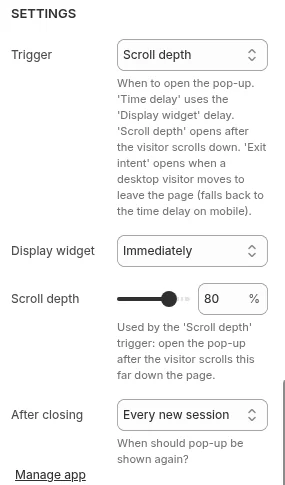
A welcome discount for first-time visitors is fine when it is real: one code, a stated end, and the same offer the visitor would get anywhere else on your site. Show it after the visitor has had time to look around, not over the first screen. Our Pop Up Discount app shows a popup after a set time on the page, at a scroll depth or on exit intent, and waits the number of days you choose before showing it to the same visitor again. Avoid fake countdowns and “only 2 left” banners that are not tied to your stock; a returning visitor can watch the same countdown start again. Other store setup guides are in the running a store hub.
Frequently asked questions
What makes a Shopify store look trustworthy? A store looks trustworthy when its own domain, visible contact details, clear shipping and return policies, real reviews and familiar payment options are all easy to find. Each of these is a Shopify setting or page you control.
Do trust badges help? Badges that state something checkable, such as accepted payment methods or a return window, repeat real information. Generic “100% secure” seals add little, since every Shopify store already runs on Shopify’s own checkout.
Should I show a popup to new visitors? Show one only after the visitor has had a chance to see the store, with an offer that is real and terms that are clear.