Grow Your Shopify Email List: Where to Ask and How

To grow an email list on Shopify, switch on every place where a visitor can agree to marketing: the consent checkbox at checkout and at customer sign-in, a newsletter section in your theme, and a signup form or popup from the free Shopify Forms app. Each address that arrives with consent lands in the Email subscribers segment, and only those customers can receive your campaigns and marketing automations.
Settings come from Shopify’s Help Center pages on customer contact information, subscriber list management and the Shopify Forms app (read October 23, 2026).
Only subscribers receive marketing
A customer who buys from you is not automatically on your marketing list. Shopify’s Help Center says you can only email people who opted in, and Shopify Messaging filters out customers who do not accept email marketing. Each customer page has a Marketing section showing their preferences, and Customers > Email subscribers lists everyone who agreed.
Make each place where people subscribe clear about what they are signing up for.
Checkout and sign-in opt-in
Once you turn it on, the checkout checkbox is shown to buyers at checkout:
- Go to Settings > Checkout.
- In Marketing opt-in, select Email.
- Decide where the checkbox is preselected:
- Regions recommended by Shopify keeps preselection in line with the local rules of each customer’s region;
- Regions you choose lets you pick regions yourself, or none, so every customer must check the box.
- Click Save.
In some admins the section shows Checkout only, Sign-in page only and Checkout and sign-in page instead, with a Preselect the sign-up option checkbox.
Consent is captured only when the customer checks the box and continues, with Pay now on one-page checkout or Continue to shipping on three-page checkout. And the default text next to the checkbox promises news and offers; if you send abandoned cart reminders, Shopify asks you to change that text so customers know.
Stores based in Germany get an extra checkbox, Require customers to confirm their subscription, in the Email marketing section of Settings > Notifications; customers must confirm before they receive marketing.
Signup forms on the storefront
Newsletter section. Shopify themes offer a newsletter signup as a section you can add to any page or as a footer option; signups go to the Email subscribers segment. Our guide on how to add a newsletter signup to Shopify walks through the theme editor.
Shopify Forms. The free Forms app is not installed by default; install it once from the App Store. It creates inline forms (inside a page) and popup forms, can collect consent for email, SMS and WhatsApp, and can attach a new or existing discount to reward signups. Popup forms need the Forms theme app embed turned on (inline forms also need a compatible theme), and popups can show as a floating teaser or as an overlay, on the first, second or third page view, immediately or after a delay, or when a desktop visitor tries to leave. If Sign in with Shop is active, eligible forms show a Claim with Shop button by default. After signup you can tag customers, trigger an automation and see analytics for each form.
Put an inline form on pages people read closely (product guides, the blog) rather than only in the footer, and keep the fields to an email address unless you need more.
Popups that trade a discount for an email
A popup asks at a chosen moment instead of waiting for the visitor to scroll to the footer. Shopify Forms popups already have delay and desktop exit triggers, and dedicated popup apps add rules such as scroll depth. In our Pop Up Discount app the visitor enters an email for a discount code, becomes a Shopify customer and receives the code through Shopify Flow, with setup and timing explained in the guide to a Shopify email popup.
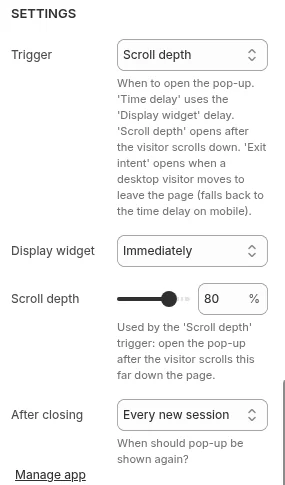
For a Shopify Forms popup, make the consent wording as clear as on the checkout checkbox, and test any popup on a phone, where an overlay takes up more of the screen than on a desktop.
Welcome emails and double opt-in
Shopify Messaging has two welcome automations, a single discount email or a series (discount, two brand emails and a reminder), which start when customers subscribe through a form on your online store. What to put in each email is in our welcome email series guide.
If you turn on double opt-in (Settings > Notifications > Customer notifications, Marketing double opt-in section, Customer marketing confirmation), Shopify sends a confirmation email automatically when someone subscribes through your store, and they join only after clicking the link. Update your newsletter form’s success message (under Online Store > Edit default theme content, labeled Confirmation or Post success depending on the theme) to tell people to check their inbox.
Mistakes to avoid
- Do not import contacts who never agreed to your marketing, such as old customers or event business cards, and email them as subscribers. If you import a list, review every name and address first.
- Do not add purchased lists. Shopify’s Terms of Service prohibit it, and it harms deliverability.
- Do not preselect the consent box in regions where the law requires an active opt-in; let Regions recommended by Shopify decide if you are unsure.
- Remove role-based addresses like info@ or support@; Shopify recommends it because nobody may read them.
Our other email articles are collected in the Shopify email marketing hub.
FAQ
Can I email customers who bought but did not subscribe? Marketing emails go only to customers who agreed to receive marketing. Order and shipping notifications are a separate type of email, set up under Settings > Notifications.
Is Shopify Forms free? Shopify Forms is free to install and use, but no plan includes it by default. Forms also need its theme app embed turned on.
Do I need double opt-in? Some countries require double opt-in by law, so check the rules where you sell; stores in Germany get an extra confirmation setting. It confirms each address before it joins your list.
Can I import my list from Mailchimp? Shopify lets you import Mailchimp contact lists by adjusting the exported file, or you can connect the Mailchimp app. Import only contacts who agreed to receive marketing from you.